Now on Android

Don't just get the answer. Learn it.

Scan or type a study question, understand it step by step, test yourself with a quiz, and turn the same topic into flashcards you can revisit.

Start as a guest with 5 welcome credits.

One question becomes a full study loop

The answer is only the first step. LearnSnap keeps the same topic moving through understanding, testing and recall.

Learn it

Scan handwriting or type the question. Every step is explained in order, with the reasoning behind it — not just a final number.

Practice it

A quiz is generated from the same topic, so you find out whether you actually understood it — with feedback on every answer.

Revise it

The topic becomes flashcards you can come back to before a test, plus a saved record of everything you've studied.

See what happens after the answer

Five real screens from the app, in the order you'd actually use them.

01 — LEARN

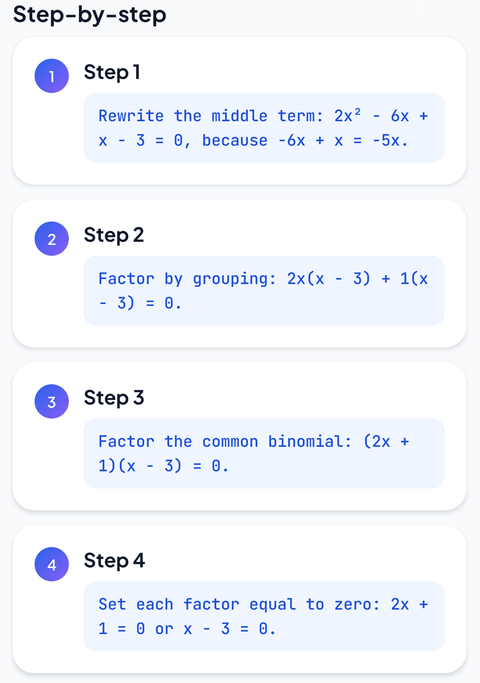
Every step, explained in plain language

The AI breaks the problem into numbered steps and tells you why each move works, so the method transfers to the next question — not just this one.

Scan or type Numbered reasoning Maths, physics, chemistry, biology
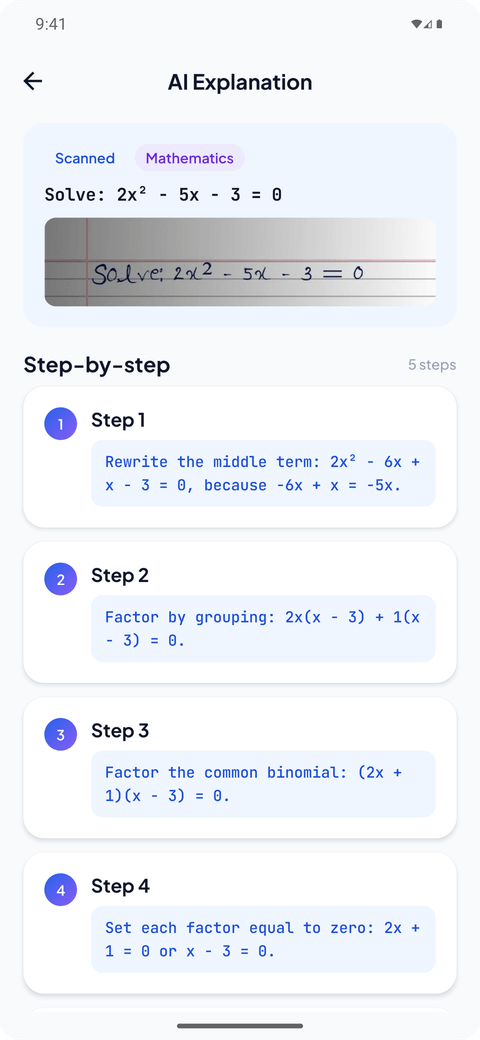
LearnSnap AI explanation screen showing a scanned math question broken into a numbered, step-by-step solution
02 — PRACTICE

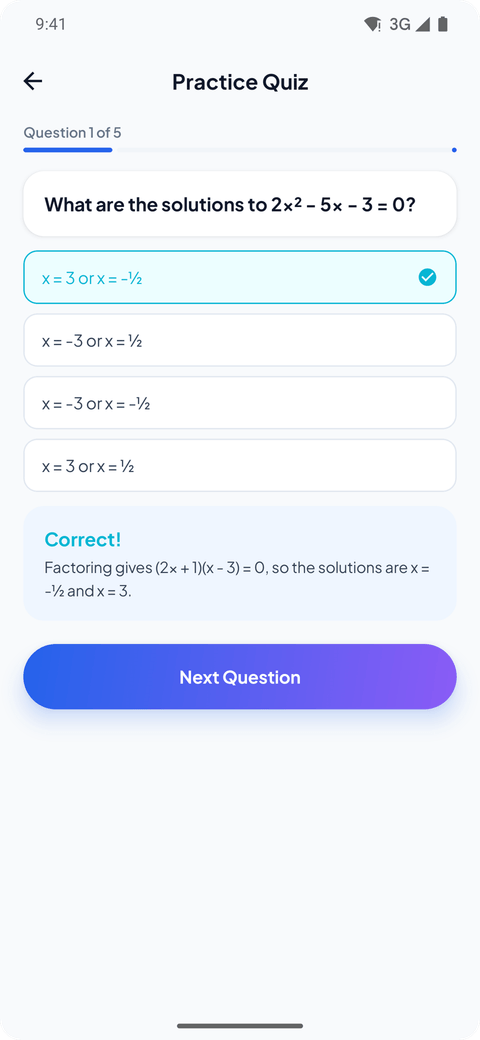
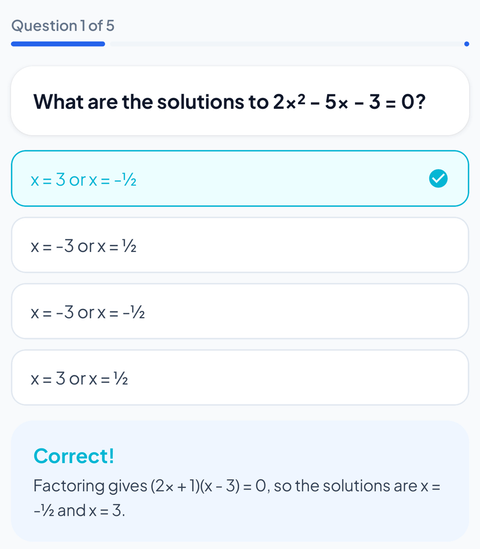
A quiz built from your own question

Five questions on the topic you just studied. Answer, get instant feedback with the working shown, and see where the gap actually is.

Auto-generated Instant feedback Scored attempts
LearnSnap AI practice quiz screen with a multiple-choice question, a selected answer, and instant correct-answer feedback
03 — REVISE

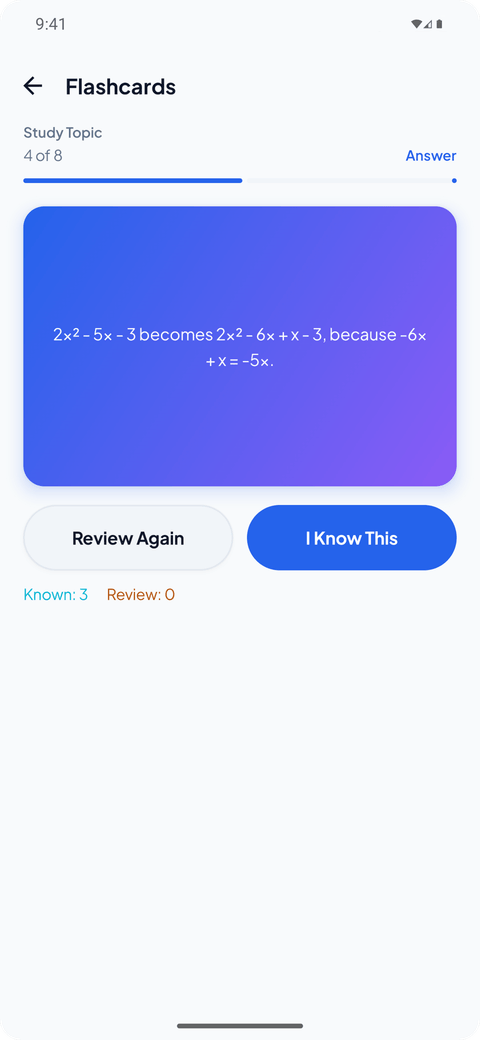
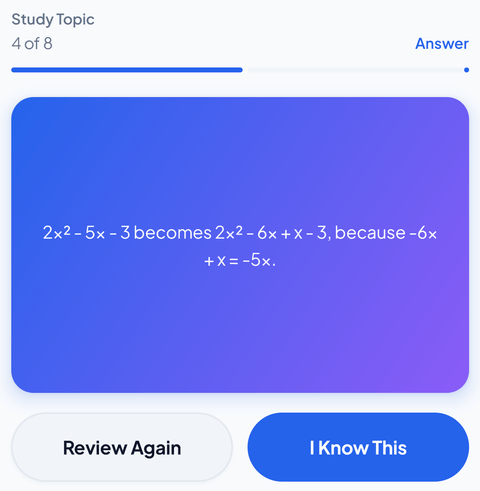
Flashcards you'll still have next week

The same topic turns into a small card deck. Mark what you know, keep what needs another pass, and pick up exactly where you stopped.

Know / review sorting Swipe through decks Reusable any time
LearnSnap AI flashcard screen with a study flashcard and Review Again or I Know This buttons
04 — SAVE

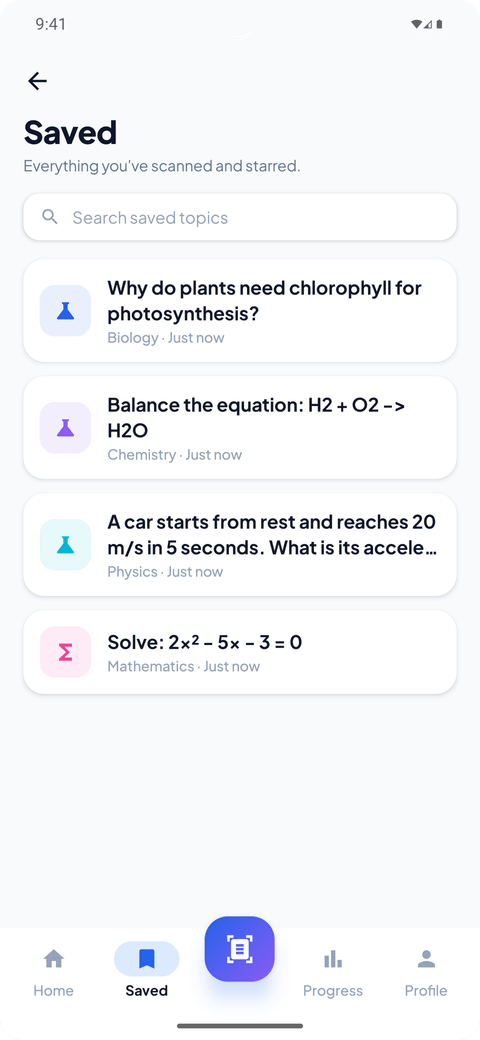
Every topic stays where you left it

Saved topics keep your scans, explanations and decks searchable and grouped by subject — so revision night starts from your own questions, not a blank page.

Searchable Grouped by subject Revisit any time
LearnSnap AI saved topics screen listing scanned questions by subject with search
05 — TRACK

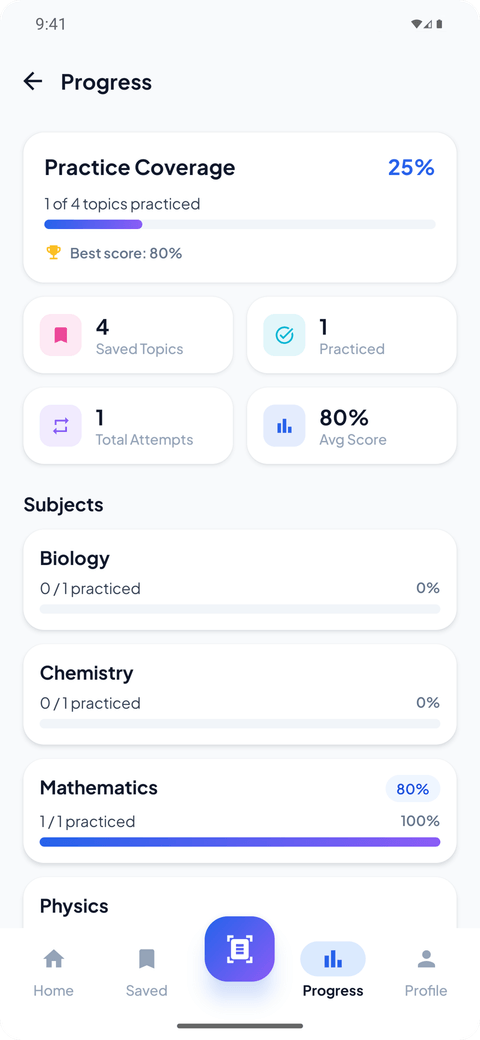
See what you've actually mastered

Practice coverage, best and average scores and per-subject progress show which topics are solid and which still need another pass before a test.

Practice coverage Best & average score Per-subject progress
LearnSnap AI progress screen showing practice coverage, best score, and subject-level progress

An answer app ends. A study loop sticks.

Most homework tools stop the moment the answer appears. LearnSnap uses that moment as the starting point — the question you photographed becomes the material you study from.

THE DIFFERENCE
TYPICAL Answer → close the app
LEARNSNAP Answer → learn → practice → revise
Get it on Google Play

Understand, not copy

Steps are written to be read, with the reason for each move. You can follow the method on paper afterwards.

Practice proves it

A quiz on the same topic separates "I read it" from "I can do it", before the test does it for you.

Remember it later

Flashcards and saved topics mean revision night starts from your own questions, already organised by subject.

Study help that stays useful

Scan or type

Photograph a handwritten problem or type it in. Both start the same loop.

Step-by-step explanations

Numbered steps with the reasoning written out, not a bare final answer.

Auto-generated quizzes

Five questions per topic with instant feedback and the working shown.

Flashcards for revision

Turn a topic into cards, then sort them into known and needs-review.

Saved topics

Everything you've scanned stays searchable and grouped by subject.

Progress tracking

Practice coverage, best and average scores, and per-subject progress.

Also included Daily Practice Ask in your language

Good to know

GOOD TO KNOW
Guests start with 5 free credits · Typed question: 1 credit · Image/scan: 2 credits Saved study material stays available for offline revision Android only AI can make mistakes; check important work

Questions students ask first

Yes. You can start as a guest with 5 welcome credits, with no account or payment card required. Typed questions use 1 credit and image/scan questions use 2 credits.

5 welcome credits; typed question = 1 credit; image/scan = 2 credits; first successful quiz generation and first successful flashcard deck generation are free.

Mathematics, physics, chemistry and biology work best today, and general study questions are supported too. Saved topics are grouped by subject so revision stays organised.

Always. Both are generated from the topic you scanned, so practice and revision use the exact material you were stuck on rather than a generic question bank.

Yes. Once a topic, quiz or flashcard deck is saved it's stored on your device, so you can revise it without needing an internet connection.

Yes. LearnSnap can explain in the language you ask in, so you're not limited to studying in English.

The steps are written to be checkable — you can follow the working yourself. Like any AI tool it can still make mistakes, so verify anything that counts towards a grade.

Start with the question you're stuck on.

Five welcome credits, no account needed. Learn it, practise it, keep it.

GET IT ONGoogle Play
Built in public during RevenueCat Shipaton 2026 →
GET IT ONGoogle Play